- not bother you with any choices or options
- install apps in their default location
- say no to toolbars or extra junk
- install 64-bit apps on 64-bit machines
- install apps in your PC's language or one you choose
- do all its work in the background
- install the latest stable version of an app
- skip up-to-date apps
- skip any reboot requests from installers
- use your proxy settings from Internet Explorer
- download apps from each publisher's official site
- verify digital signatures or hashes before running anything
- work best if you turn off any web filters or firewalls
- save you a lot of time!
Sunday, February 16, 2014
Install and Update All Your Programs at Once
Error message: "The Computer Restarted unexpectedly or encountered an unexpected error" after System Startup on Windows 7 Recovery
- HKLocal machine/SYSTEM/SETUP/STATUS/ChildCompletion,
- and after highliting childcompletion,on the right hand side look for setup.exe.
- if the value is 1 change it to 3. Double click on setup.exe and change the value shown in the box.
- Then close the registry editor and then also close the black screen window
- Then click on OK for the error and the computer will restart and the installation may complete.
- After the reboot it will setup new Windows. Be patient because it will take longer depending on the speed of your PC, as long as the harddrive continuous to light up. No need to panic!
Sunday, November 17, 2013
Harman Kardon Soundsticks 3
Saturday, March 10, 2012
Dev-C ++: An easy way to create c++ programs

Dev-C++ is not some bug-ridden, limited edition C++ compiler from some flyby- night group of developers. Dev-C++ is a full-fledged C++ environment. Dev- C++ supports the entire C++ language and executes all the programs you might find in the internet and any other C++ book) and works just fine.
Dev-C++ does generate Windows-compatible 32-bit programs, but it does not easily support creating programs that have the classic Windows look. If you want to do that, you’ll have to break open the wallet and go for a commercial package like Visual Studio.NET.
You can download a trial of Bloodshed Dev-C++ by clicking this link: http://download.cnet.com/Dev-C/3000-2069_4-12686.html
Using Dev-C++
This section is probably why you are here.
All programming done for CSC161 will require separate compilation projects (i.e. class header file(s), class implementation file(s) and a main/application/client/driver file). This process is relatively easy as long as you know what Dev-C++ requires to do this.
Step 1: Configure Dev-C++.
We need to modify one of the default settings to allow you to use the debugger with your programs.
- Go to the "Tools" menu and select "Compiler Options".
- In the "Settings" tab, click on "Linker" in the left panel, and change "Generate debugging information" to "Yes":
- Click "OK".
Step 2: Create a new project.
A "project" can be considered as a container that is used to store all the elements that are required to compile a program.
- Go to the "File" menu and select "New", "Project...".
- Choose "Empty Project" and make sure "C++ project" is selected.
Here you will also give your project a name. You can give your project any valid filename, but keep in mind that the name of your project will also be the name of your final executable. - Once you have entered a name for your project, click "OK".
- Dev-C++ will now ask you where to save your project.
Step 3: Create/add source file(s).
You can add empty source files one of two ways:
- Go to the "File" menu and select "New Source File" (or just press CTRL+N) OR
- Go to the "Project" menu and select "New File".
Note that Dev-C++ will not ask for a filename for any new source file until you attempt to:- Compile
- Save the project
- Save the source file
- Exit Dev-C++
- Go to the "Project" menu and select "Add to Project" OR
- Right-click on the project name in the left-hand panel and select "Add to Project"
If you do have suggestions, feel free to comment below..
Friday, March 9, 2012
How to Make an ERD
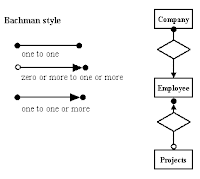
Cardinality Notations
Cardinality specifies how many instances of an entity relate to one instance of another entity.
Ordinality is also closely lined to cardinality. While cardinality specifies the occurances of a relationship, ordinality describes the relationship as either mandatory or optional. In other words, cardinality specifies the maximum number of relationships and ordinality specifies the absolute minimum number of relationships. When the minimum number is zero, the relationship is usually called optional and when the minimum number is one or more, the relationship is usually called mandatory.
There are many notation styles that express cardinality and they are all supported by SmartDraw.


Data model- is an abstract model that documents and organize the business data for communication between team members and is use as a plan for developing applications, specifically how data is stored and access.(software engineering)*dapat naiintindihan ng lahat*it should be software and hardware independent.
-represented by ONE SYMBOL G.

If you do have suggestions, feel free to comment below..
Saturday, March 3, 2012
Making money with Twitter!!
Success Secrets To Increase Your Profits and Sales Using Twitter Business Strategies
1. How are you going to make money with
Twitter?
- First of all you need a lot of followers
- When you have enough followers, you need to send them ads, they click on it and you'll start earning money,that's all!
2. Is this going to cost you a lot of time?
Not at all! I tested this method for you and I found the best and fastest way to earn money with Twitter. So all you have to do is follow this instructions. At First, it s going to take some time to create and manage all the accounts, but at the end all you have to do is write some tweets every day, it takes about 5 minutes, that s all!
3. Why do I write this eBook?
I am also using this method and I'm earning a lot of money with it. Now I want you to give you this info so you can make money too and I can make even more m oney! This eBook if free so in return I just ask you to create a RevTwt account via this link. http://revtwt.com /index.php?id=54325 When you start earning money on this site, I receive 20% on top of your
income. Once you've created your own account, go to the Referrals tab and you get your very own link that you can give to other people and receive 20% on top of their earnings!
4. This is what you need to start earning money
- Twitter Account http://twitter.com/signup
- Paypal Account https://www.paypal.com/id/mrb/pal=SBG9U4FNGU6YC
- RevTwt Account http://revtwt.com/index.php?id=54325
- Tweetlater Account http://www.tweetlater.com/register
- Hummingbird Account http://hummingbird2.com/cmd.php?af=1178547
5. Logon to your Twitter account and change these
Settings
6. Account
- Name, Username, Email
- Time Zone: Take a time zone between GMT -08:00
and-
05:00 because most people who follow me are from the
United States (Can be different for your situation!)
- More Info URL: Here you can promote your website
- One Line Bio: This is also important, just write
something about yourself
- Location and Language
7. Notices
Uncheck Email when someone starts following me
,
because over 10.000 people are going to follow you from you, so thats a lot of spam.
8. PayPal Account
This is simple, create an account
https://www.paypal.com/id/mrb/pal=SBG9U4FNGU6YC
and verify you credit card or
top up your account.
9. RevTwt Account
This is the site you
ll need to start earning money. Don't forget to sign up with my link, thanks! (http://revtwt.com/index.php?id=54325) Go to Twitter Accounts , add your twitter account(s) and AutoPost 2 Ads/Day. Click submit to save your changes. This site will now automatically post 2 ads each day so all you have to do is sit back and earn money.
10. Tweetlater Account
Create an account and go to Account, Add Accounts and. Check Automatically send a welcome message to new followers and in the Send This Message: box you write something like: Thanks for following! I am making money on twitter, you can too Also check Auto
http://revtwt.com/index.php?id=54325
Unfollow.
11. Hummingbird
Their sales page is this:
http://hummingbird2.com/cmd.php?af=1178547
With this software you can add a lot of followers, very fast. You can make followers 300/day!
12. Login Twitter
Log in with you Twitter Account and go to Tools, Find Targeted Followers. Go to Find suggested users, select all and click Follow. Then do this again but stay on the Find on Twitter
tab. Search on a keyword like Twitter, website, marketing, woman, Click on an account that has between 1000 and 2000 followers. Click on Followers or Following , wait a few seconds and click on Follow All.
Now Hummingbird starts following them all, this can take a while. You can follow 2000 people max, this is a limit on Twitter and you can only break it by getting more Followers. Now you 've followed 1000-2000 people. Wait 48 hours and let them follow you back. This is how you get followers! Once you have as much followers as people following you, you have to flush the people that you are following, but don't followyou back. So click on following and click the
bottom right corner button labeled Unfollow All But do NOT do a "mass unfollow" of thousands at a time. You are sending a red flag and an increased chance of your account
getting suspended.
Repeat from step 12 Keep doing this to get as much followers as u need..
13. Launch it, add all you Twitter accounts, click Tweet
(upperleft), select all you Twitter accounts and Tweet something.
Now you are Tweeting to all your accounts at the same time!
14. What to do next?
Repeat step 12 every 48 to 72 hours and step 13 every day.
15. Last notes
Thank you for reading this tutorial. I know it will work for you. Please dont forget to sign up @ RevTwt with my link.
(
errors, just let me know (It will probably be full of it). ). I you
see any spelling http://revtwt.com/index.php?id=54325
If you do have suggestions, feel free to comment below..
How to Get Rid of Hackers?
Do you spend most of your time with social networking networks like Facebook and Twitter? Sharing your thoughts and ideas with friends through your tweets and wall post are the most exciting part of interacting with them. Your funny photos and live captured videos made all of these a total web experience. But doing all of these can expose you to possible intruders or hackers especially when you communicate with people you really do not know personally. So I'll give you preventive measures on how to get rid and protect your account. Here are the steps:
4. Enable HTTPS: When you bookmark the URL for Facebook or any of your other social networks, be sure to use HTTPS instead of HTTP. This encrypts your communications.
5. REVIEW PERMISSIONS GRANTED TO THIRD PARTY APPS
For any account that really matters—your email, your bank and credit card accounts, Facebook—you need to use a unique, strong password that you do not use for any other account. Whenever a site is hacked, you see that this creates a security crisis across the Web. Why? People reuse passwords. Don’t be one of those people.